Growshapes
  • 3D Scanner Store
    • Rent & Try Before You Buy
    • Shop Best Sellers
    • Handheld 3D Scanners
    • Desktop 3D Scanners
    • Shining 3D >
      • EinScan Reverse Engineering Packages
      • EinScan Libre
      • EinScan Rigil
      • EinScan H2
      • EinScan Medixa
      • EinScan Pro 2X V2
      • EinScan SP V2
      • EinScan SE
      • Einstar
      • EXModel Software
      • Industrial Pack for EinScan Pro Series
      • Color Pack for EinScan Pro Series
      • EinScan Pro Power Bank
    • Matter and Form
    • eviXscan3D >
      • eviXscan3D Quadro+
      • eviXscan3D Optima + M
      • eviXscan3D WideRange 65
      • eviXscan3D Fine Precision
      • eviXscan3D Suite 2.8
      • eviXmatic
    • 3D Scanner Sale!
  • Learn More
    • Support & Training Videos
    • 3D Scanning FAQ >
      • EinScan 3D Scanner FAQ
      • HP 3D Scanner FAQ
    • Case Studies
    • 3D Scan Gallery
  • 3D Scan Blog
  • Contact Us
  • About
    • Terms and Conditions
    • Privacy Notice
    • Fact Sheet

LET'S TALK ABOUT 3D SCANNING

New updates for Solid Edge Shining 3D Editions 2022

5/9/2022

0 Comments

 
Solid Edge 2021 brought us powerful performance updates to make our working flow more efficient in the areas of Reverse Engineering as well as Part Modeling, and this year, it moves further, launching the promising and practical next generation design functions, Subdivision Modeling and Convergent Modeling.
Let´s take a look at the detailed updates of Solid Edge 2022 and discover its advantages and innovations.

Please note:
  1. Users who activated Solid Edge SHINING 3D Edition Floating Version (not for dongle key) between 2021/5/9 and 2022/5/9 can update to the latest version for FREE. Download the software now.
  2. Users who activated Solid Edge SHINING 3D Edition before 2021/4/26 can obtain a FREE license in exchange for a Solid Edge/EinScan case study. (See reference@https://youtu.be/QhN5jqbbEiI) If you are interested in updating via this option, please fill in the form.
  3. For more upgrade options, please feel free to contact [email protected]

Subdivision Modeling Enhancements

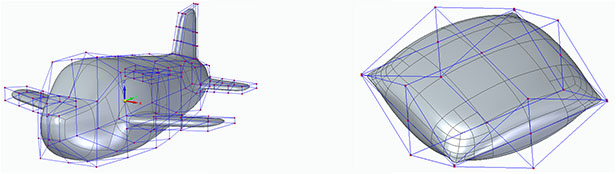
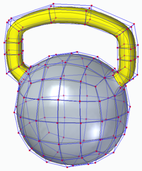
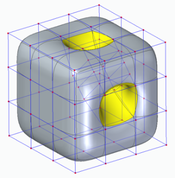
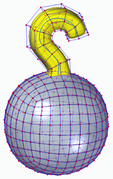
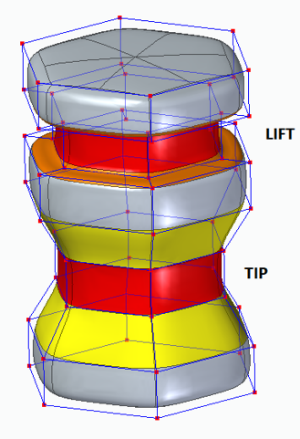
Subdivision Modeling makes it easier to generate a stylized body and control its shape by using a polygonal cage. Solid Edge 2022 introduces new modification functions.
Picture
Picture
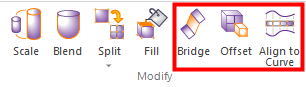
Bridge

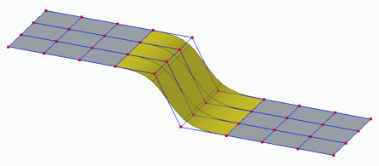
In the Subdivision Modeling environment, you can use the new "Bridge" command to create a loft-like feature that connects edges or faces selected on a single cage or two separate cages.
Picture
Open bridge, with edges as input
Picture
Two section bridge, with shape curve
Picture
No shape curve, linear bridge
Picture
One-sided bridge

Offset Cage Faces


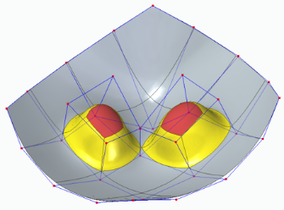
Offset allows users to select faces of a cage and offset them along their normal direction. Offset allows users to select faces of a cage and offset them along their normal direction. Offset allows users to select faces of a cage and offset them along their normal direction
Picture
Picture
Picture

​Split with Offset
​

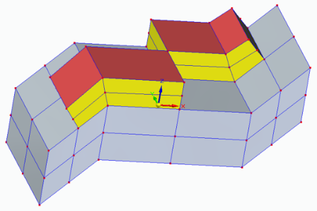
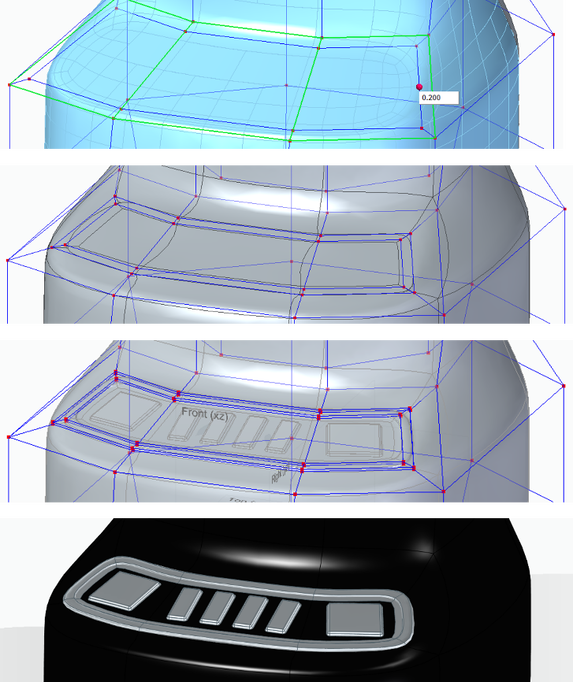
Allows adding local detail to model without having to split the entire model, use the new "Split with Offset" command to add detail to a face by offsetting the new faces inward by a user-defined amount.
Picture

​Align to Curve
​

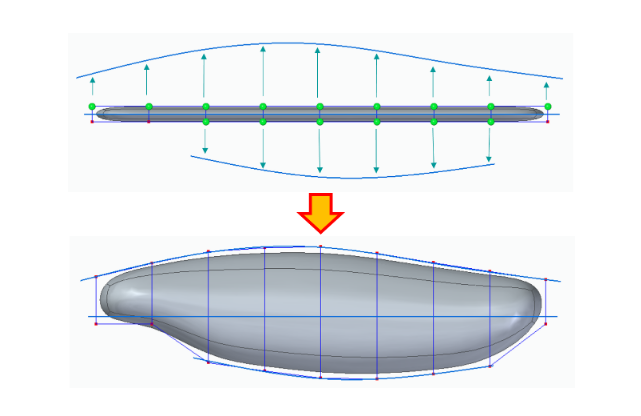
​Use the new Align to Curve  command to fit the vertices of body cage faces to one or more existing curves or to curves you interactively sketch. You can undo and redo each curve edit until you achieve the desired shape.
Picture

​Convergent Modeling

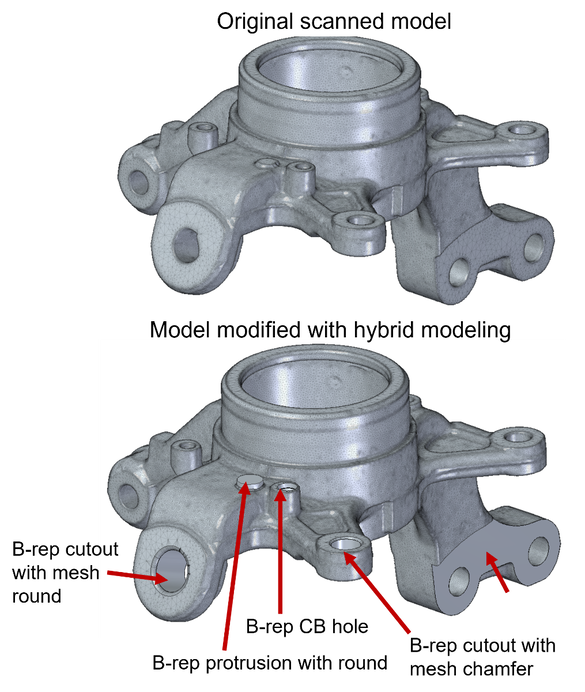
Solid Edge now supports mixed mesh modelling (a.k.a Hybrid Convergent modelling). Mesh and Classical faces are in one body, this is extremely helpful when you do assembly reverse engineering and 3D printing.
Picture
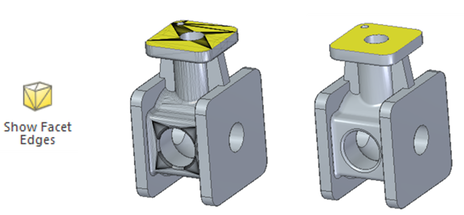
The new "Show Facet Edges" command controls the display of facet edges within a model. When selected, the command displays the facets; when deselected, the facet edges are not displayed.
Picture

​Reference Point Cloud

New capability to insert .asc point cloud scan files into Assembly. Visualize & evaluate Solid Edge models in the context of point clouds
Picture

​With all new features, Solid Edge 2022 Shining 3D Edition allows you to do more with your scanned data.  It is the practical and efficient solution for engineers, designers and 3D enthusiasts for sure.

​Growshapes the official U.S. distributor of Shining 3D EinScan 3D scanners. We now carry the eviXscan 3D scanner from Evatronix as well!

​See the innovators on Growshapes’ social media channels to get the latest expert news on innovation in 3D digitization, then share your thoughts and join the conversation about 3D digital innovation with #digitize3D

0 Comments

When the old and new collide: 3D scanning Bizen-ware

9/20/2018

0 Comments

 
​Growshapes likes 3D-scanning stuff (naturally!) to see how digitization impacts industry and people.  

This month we 3D-scanned a beautiful Bizen-ware bird, created by Japanese ceramic artist Yukiko Akai, who lives in Okayama Prefecture, Japan. Yukiko uses an 800-year-old kiln firing method for ceramics, which originated on the Korean peninsula and migrated to the town of Bizen, Japan, eventually evolving into Bizen-ware. Bizen-ware is a durable ceramic with a distinct gloss created from a chemical reaction of clay, fire, and firewood ash, rather than from glazing.  Even without glazing, the ceramic is watertight.
 
Because of Bizen-ware uses all-natural materials and processes, Yukiko also participates in the excavation of medieval kilns to research historical kiln structures, document findings, and educate others. Such research aims to not only uncover the past, but also enable exploration of new artistic expressions.
 
This summer, Yukiko and her Master (teacher) undertook a project in Arkansas to recreate the Bizen-ware process there, using the clay and local materials of Arkansas.  You can read more about the project here.

When Growshapes encountered her work, the first thing we thought was, “Let’s digitize!”

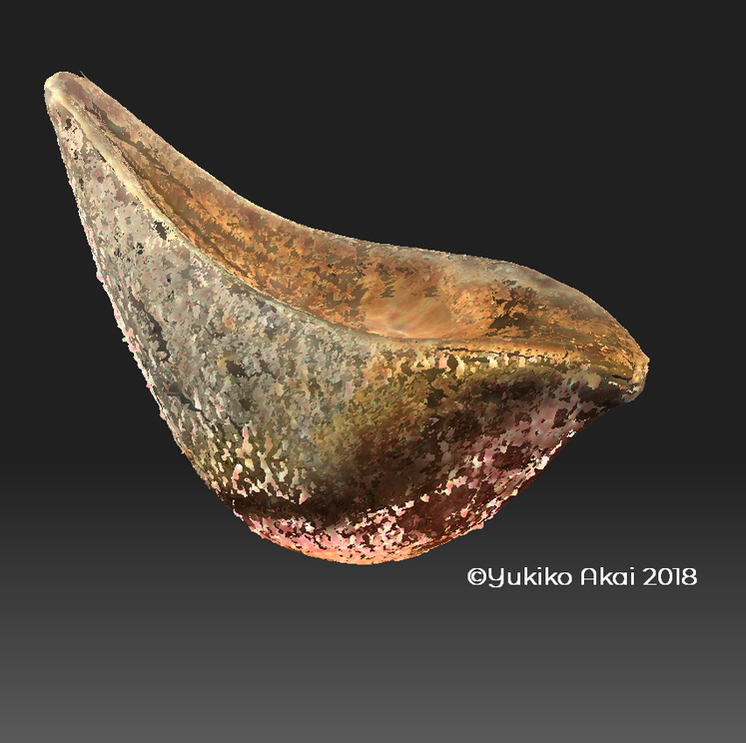
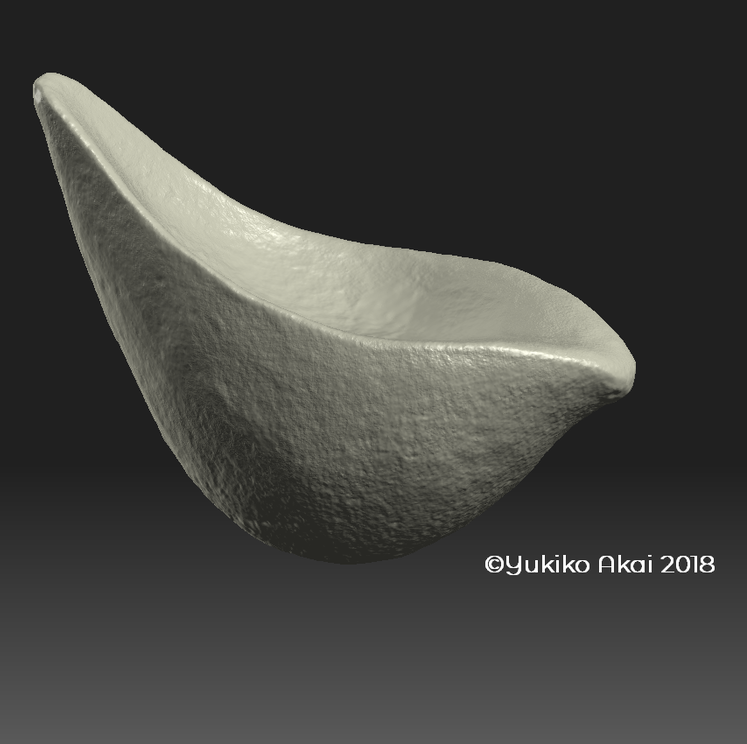
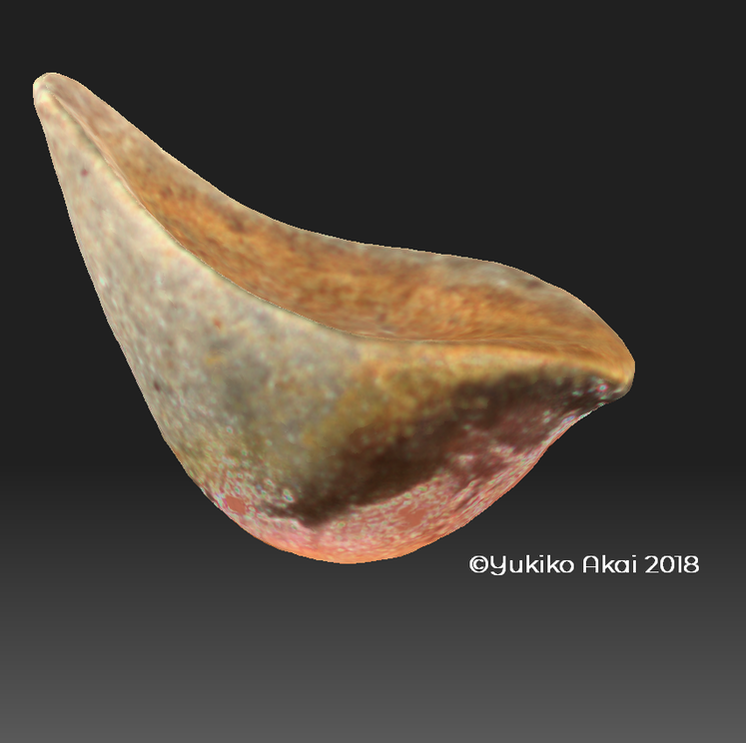
So here it is.  A piece from Yukiko's signature "Bird" series in its digital glory. 
Picture
Scan files with texture
Picture
Fused file without texture

Picture
Fused file with texture
Picture
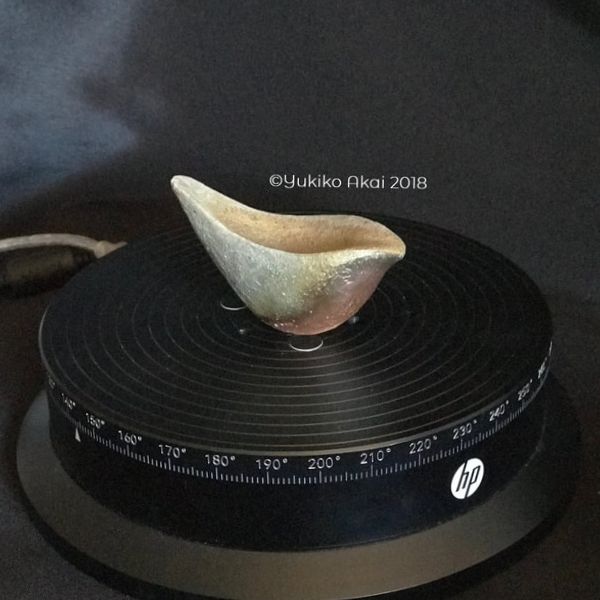
Photo of the actual Bizen-ware "Bird"
This piece was a bit tricky to 3D scan due to its dark color, gloss and the concave shape on the top.  The key was to place the object in the right position, 3D scan from several angles so that the light would cast on all angles of the object. ​
 The "Bird" has been scanned using the HP 3D Structured Light Pro S3 with dual camera, with the scanner set up on the desk scan lever, and the object placed on the automated turntable. 

Click to buy the HP 3D Structured Lights Scanner Pro S3 with Dual Camera Bundle.

The whole scanning process took less than 2 hours from set up to file clean up.  Organic shapes, especially symmetrical ones, tend to be difficult to align in 3D scanning.  But the HP 3D scanner alignment features really excelled once again!

"Now I actually understand how digitization of traditional physical objects can be achieved. To see my actual creation in digital form is quite exciting! " said Yukiko upon seeing the digital 3D scan files.

"Digitization will definitely help in preserving physical objects as information and be analyzed. The information can also continue to be used in the future .”   ​​

Picture
Yukiko Akai, Bizen-ware artist
Picture

​Yukiko’s “Bird” series is something she has created since 2012.  Having grown up surrounded by nature, Yukiko wanted to express beautiful organic shapes through ceramics.  During the Bon Festival when Yukiko was honoring her grandfather’s spirit, a beautiful bird landed in her garden and befriended her. That was when she decided to create the “Bird”.  The series have further evolved to have a more streamlined form after visiting the U.S. and seeing a bird soar in the sky. She felt the wind as she watched the bird fly away and wanted to express it. 

​How beautiful! 

Growshapes is an HP Silver Partner of HP 3D scanning solutions and the official U.S. distributor of Open Technologies 3D Scanners - an endorsement that makes us proud.

​See the innovators on Growshapes’ social media channels to get the latest expert news on innovation in 3D digitization, then share your thoughts and join the conversation about 3D digital innovation with #digitize3D
0 Comments

Join us at the 3D Printing Workshop for Small and Medium Sized Businesses at San Jose State University on September 25th!

9/23/2014

0 Comments

 
Click Here to Join Us!
Register

location:

key sponsor

Picture

Additional Sponsors:

Picture
Picture
Picture
Picture
Picture
Growshapes will be demonstrating the 3D printing software by netfabb, 3D Laserscanner by David Vision and various 3D printing materials.  Come see us and learn about the endless possibilities of adopting 3D printing technologies in your business. 

Event:  3D Printing Workshop for Small to Medium Sized Businesses
by California Network for Manufacturing Innovation (CNMI)

Date & Time:   September 25, 2014,  8am -4:30pm

Location:  San Jose State University Library (150 E San Fernando St)

Cost:   $79 (Click on the Register Button on the left)


Overview:

An introductory "How To" course to get your business moving with 3D printing - or - How to grow your business with a 3D printer. This workshop will provide an overview of additive manufacturing practices, equipment and skills required to implement the technology.

Who should attend:

  *   Designers 
  *   Entrepreneurs
  *   Manufacturers
  *   Academia
  *   Small Business Owners

Additional sponsors:

Lawrence Livermore National Laboratories, Centers for Applied Competitive Technologies (CACT), Studio FATHOM, growshapes and TechShop. CNMI is a designated California statewide Innovation Hub.

Agenda:

8:00 am - 8:30 am  Registration
   -------------------------------------------------------------------------------------
8:30 am - 12:30 pm  - Lecture
Session 1             Additive Manufacturing Global Market Overview
Session 2             Technology Overview
Session 3             Case Studies
Session 4             Business Case for Additive Manufacturing
   ---------------------------------------------------------------------------------------
12:30 pm - 1:30 pm   Lunch on your own
   -----------------------------------------------------------------------------------------
1:30 pm - 3:30 pm - Additive Process & Equipment Demonstrations
Session 1             Laser Scanning Application
Session 2             DMLS Applications
Session 3             FDM Applications
   -------------------------------------------------------------------------------------------
4:00 pm - 5:00 pm  San Jose TECHSHOP Tour
   --------------------------------------------------------------------------------------------
0 Comments

Mcor Receives Green Award

9/15/2014

0 Comments

 
Picture
Growshapes is proud to announce Mcor celebrated its victory of receiving the Green Award at the 3D Printshow 2014 global awards ceremony in London. Recognized for its unique eco-friendly approach to 3D printing, Mcor is repeatedly noted as being one of the most innovative 3D printers to exist.

The company was awarded for producing a stunning full color paper Durga idol that is impressive not only in detail but also for its wide array of color. Idols can now be designed in India and printed world wide from any Mcor printer which will allow people to stay further connected to their traditions.

Read more about the Durga and Mcor's victory.

Did you know Growshapes is an official Mcor reseller? Learn more about Mcor 3D Paper Printers directly on our website.

0 Comments

netfabb will present at Silicon Valley Forum

8/14/2014

0 Comments

 
Picture
Picture
Picture


Presenter:
Ulf Lindhe, Business Development Manager, netfabb GmbH4

Description

Learn about the latest developments with netfabb software for 3D printing, including how it uses structures to create brand new materials which do not exist in nature (biomimicry), and more with Ulf Lindhe, Business Development Manager at netfabb GmbH.

It has been a year since Ulf's last presentation to our group. This is a great opportunity to find out what's new.

Some netfabb testimonials (http://www.netfabb.com/testimonial.php):

-  "netfabb is a very significant development in software for design of parts for manufacturing using rapid prototyping technologies. The software frees the product development engineer from the limitations of complexity and file size in conventional CAD programs. We use the software for designing lightweight high performance ceramic structures with tailored macro and micro porosity." Andrew Jeffery, Founder and President, Viridis Innovation LLC, Boston MA, www.viridisinnovation.com

- "netfabb’s Selective Space Structures (3S) has been incredibility useful to us. It is the only software we have found to date that is capable handling and producing large net structures required for the scale of components we produce for the aerospace industry."

- “We were pleased to find netfabb a reliable and powerful software capable of producing complex lattice structures with locally tailored geometry. In the design of customized Titanium Implants, such a capability proves to be very useful in enhancing bone response and controlling the mechanical behavior of the implants. The software has very intuitive commands that enhances the creative design of structures, minimizing time and memory usage, making the production of parts with very high complexity a breeze rather more than just a possibility.” Gilbert Chahine, Research Assistant and PhD Candidate, Research Center for Advanced Manufacturing, Lyle School of Engineering, Southern Methodist University, Dallas, Texas, USA http://www.smu.edu/Lyle/Departments/ME/Research/RCAM.aspx
register
Contact growdhapes ([email protected]) for special invitation
0 Comments

netfabb Version 5.2 Upgrade Includes Ability to Design in Color

8/12/2014

0 Comments

 
Highlights of netfabb 3D software's recently released upgrade to version 5.2 include:
  • Ability to design and create colorful parts
  • Advanced graphic tools for simple surface
  • Parametric color, texture, and picture application for complexly curved surfaces
  • Ability to work simultaneously with multiple build platforms to maximize your
    work efficiency
  • Refined part orientation
  • Plug-in for Microsoft® Kinect®
  • Japanese user interface

For more information on each of these exciting new features related to 3D printing, click here.

netfabb Professional 5 users get the upgrade for free! Simply click on the "Help" menu and select "Upgrade netfabb."

netfabb Studio Professional 4.X users can upgrade to version 5.2. Contact GrowShapes for more information.
0 Comments

DAVID Software Update -- Version 3.10.4

8/11/2014

0 Comments

 
DAVID Vision recently released an update to their 3D scanner software. The full version number is: 3.10.4.4657

DAVID_Setup_3.10.4.4657.exe (6.71 MB)

This is an installer for the latest version of DAVID scanner Free Edition, 32 and 64-bit, including the trial edition of DAVID-Shapefusion.

The calibration patterns are included as PDF and CDR files.

Languages: English, Chinese, Czech, Estonian, French, German, Greek, Italian, Polish, Russian, Spanish, Turkish

Prerequisites for execution:
  •     DAVID runs on Windows XP, Vista, 7 or 8.
  •     You need the Microsoft .NET Framework 3.0 SP1 or higher and DirectX9 or higher.
  •     The installer also includes a 64-bit version of DAVID3.
  •     For the 64-bit version you need the .NET Framework 4.5 and Windows 7 64-bit or higher.

The download file on the DAVID website is located here.

Installation:
  1. Download the installer exe file.
  2. Launch it.
  3. Choose standard windows installation (will create start menu entries, may require administrator rights), or  extraction only, or Update USB if you own the USB Edition.
  4. If you do not already own it, purchase a DAVID Professional Edition license file and put it into your DAVID folder. Or, upgrade from an existing license version 2.x to activate all full-version features.

The DAVID scanner creates 3D data for reverse engineering, quality inspection,product development/prototyping, art art and science, medical use and more.
0 Comments

GrowShapes/Silicon Valley 3D Printing Accelerator hosts Open House for IDSA-SV

7/24/2014

0 Comments

 
growshapes and the soon-to-launch Silicon Valley 3D Printing Accelerator will be hosting an Open House this evening from 6:30 to 8:30pm at their Santa Clara office for the Silicon Valley chapter of the Industrial Designers Society of America (IDSA-SV).

As part of the Open House, growshapes CEO, Geoffrey Doyle will give a brief presentation on biomimicry and industrial design. His talk will focus on how the development of new structures (or combining existing structures in new ways) enables the development of new 3D printing materials. Geoffrey will also illustrate how new structures and 3D printing technologies will dramatically impact the way prototypes and products are manufactured.

There will also be product demonstrations:


  • growshapes :  DAVID 3D scanner, netfabb 3D software (which facilitates Selective Space Structures), Augmented Reality for building design, Mcor IRIS color 3D paper printing, Afinia desktop 3D printing
  • Octave: desktop 3D printing (various models, including Makerbot)
  • UpTech3D: prototype design for 3D printing

The growshapes team also runs the SVForum 3D Printing group, as well as 3D Printing for Education Meetup, to educate the Silicon Valley on emerging corporate 3D printing and scanning technologies.

Registration information can be found here.
0 Comments

    Growshapes

    Provider of leading edge 3D scanning products and services. We see 3D!

    Archives

    November 2024
    July 2024
    June 2024
    May 2024
    March 2024
    December 2023
    October 2023
    June 2023
    April 2023
    February 2023
    October 2022
    September 2022
    August 2022
    May 2022
    April 2022
    March 2022
    February 2022
    November 2021
    October 2021
    August 2021
    April 2021
    March 2021
    January 2021
    December 2020
    November 2020
    September 2020
    August 2020
    June 2020
    April 2020
    March 2020
    January 2020
    December 2019
    November 2019
    October 2019
    June 2019
    May 2019
    January 2019
    December 2018
    November 2018
    October 2018
    September 2018
    August 2018
    July 2018
    June 2018
    May 2018
    April 2018
    March 2018
    February 2018
    January 2018
    December 2017
    November 2017
    October 2017
    September 2017
    August 2017
    July 2017
    April 2017
    February 2017
    January 2017
    December 2016
    November 2016
    October 2016
    July 2016
    June 2016
    May 2016
    April 2016
    January 2016
    December 2015
    November 2015
    October 2015
    September 2015
    July 2015
    June 2015
    April 2015
    March 2015
    January 2015
    December 2014
    November 2014
    October 2014
    September 2014
    August 2014
    July 2014
    June 2014
    May 2014
    April 2014
    March 2014
    February 2014
    January 2014

    Categories

    All
    3D Printing
    3D Scan File Ouput
    3D Scanner Rental
    3D Scanner Setup
    3D Scanning
    3D Scanning Colorful Objects
    3D Scanning Dark Surfaces
    3D Scanning Faces
    3D Scanning Highly Details Objects
    3D Scanning Humans
    3D Scanning Large Objects
    3D Scanning Mid Size Objects
    3D Scanning Shiny Surfaces
    3D Scanning Small Objects
    3D Visualization
    Additive Manufacturing
    Afinia
    Alignment In 3D Scanning
    Artec
    Augumented Reality (AR)
    Blue Laser
    Blue Light
    Creaform
    DAVID 3D Scanners
    Design
    Desktop 3D Printers
    Ecology/Sustainable
    Education
    EFoil Wing
    EinScan 3D Scanners
    EinScan 3D Scanner Software
    Einscan H
    EinScan H2
    EinScan HX
    EinScan Pro 2X
    EinScan Pro 2X 2020
    EinScan Pro 2X Plus
    Einscan Pro 2X V2
    EinScan Pro HD
    EinScan SE/SP
    Einstar
    Engineering
    Evatronix EviXscan
    Field Of View
    FormLabs
    Geomagic
    Go!SCAN
    HP Structured Light Scanner Pro S3
    Industrial Kit
    Infrared
    Laser 3D Scanning
    MacOS
    Makerbot
    Makerspace
    Market SIze
    Mcor IRIS 3D Printer
    Medical
    Mesh Optimization
    Netfabb Software
    Open Technologies Cronos 3D Scanner
    Orthotics And Prosthetics
    Product Developers
    Prototyping
    Reverse Engineering
    Shining3D
    Software Updates
    Solid Edge Software
    Structured Light 3D Scanning
    Transcan C
    White Light
    Workforce Development

    RSS Feed

Vertical Divider

GROWSHAPES

963 Topsy Ln STE 306  PMB 245, Carson City, NV 89705
​+1 ‪(775) 241-8864‬
​
Email: [email protected]

Stay connected

Menu

Shipping & Returns
3D Scanning Products
Terms and Conditions
About Us
EinScan Gold Expert badge, Shining 3D Official Reseelr Badge
Picture
  • 3D Scanner Store
    • Rent & Try Before You Buy
    • Shop Best Sellers
    • Handheld 3D Scanners
    • Desktop 3D Scanners
    • Shining 3D >
      • EinScan Reverse Engineering Packages
      • EinScan Libre
      • EinScan Rigil
      • EinScan H2
      • EinScan Medixa
      • EinScan Pro 2X V2
      • EinScan SP V2
      • EinScan SE
      • Einstar
      • EXModel Software
      • Industrial Pack for EinScan Pro Series
      • Color Pack for EinScan Pro Series
      • EinScan Pro Power Bank
    • Matter and Form
    • eviXscan3D >
      • eviXscan3D Quadro+
      • eviXscan3D Optima + M
      • eviXscan3D WideRange 65
      • eviXscan3D Fine Precision
      • eviXscan3D Suite 2.8
      • eviXmatic
    • 3D Scanner Sale!
  • Learn More
    • Support & Training Videos
    • 3D Scanning FAQ >
      • EinScan 3D Scanner FAQ
      • HP 3D Scanner FAQ
    • Case Studies
    • 3D Scan Gallery
  • 3D Scan Blog
  • Contact Us
  • About
    • Terms and Conditions
    • Privacy Notice
    • Fact Sheet